v13.1 — 2026-10-28
New
Listing Studio lets you write product listings optimized for Shopify, Etsy, WooCommerce or Big Cartel.
In Listing Studio you can start from an existing piece, compare suggestions with your current text, save only the changes you accept, and restore the original listing.
Listing Studio can export to a Shopify CSV, create Shopify draft copies, and protect a listing from changes.
Listing Studio saves materials, stone, price, SKU and product type back to the piece. You can pick metal and stone from your materials library and choose a product type from a dropdown.
Listing Studio checks listings against your brand rules, including the words to avoid from your Brand Profile, and uses your preferred currency.
Your own platform templates in Listing Studio take priority over your brand's default template.
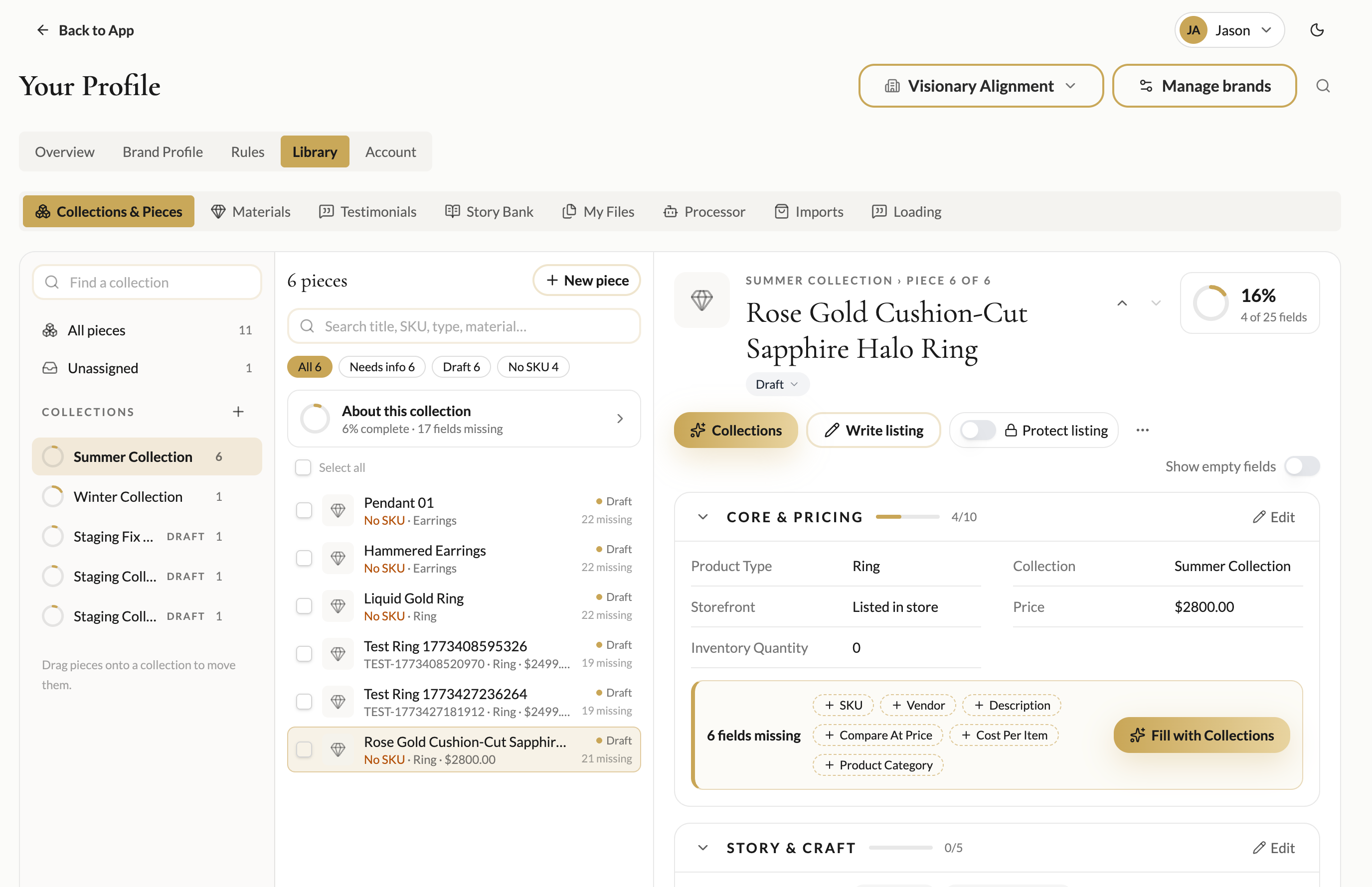
Open Listing Studio from the sidebar, the account menu, the ⌘K search, or the new Write listing button on collection cards.
A new Rules tab on Your Profile lets you write standing brand rules in plain sentences and choose where each rule applies.
You can see and manage your rules from a pill and drawer in chat, and filter them with "Show rules for" chips.
Rules are applied only to the assistants and places you choose. Brand word lists are also supported.
A standard materials library makes adding materials faster. A Tidy panel helps clean up your materials, and imports can bring in categories.
Collections & Pieces has a compact read view and a side-by-side split view.
Fields in Collections & Pieces suggest your brand's existing values and standard options as you type, with an option to add new ones.
Search finds pieces by material.
A new Analytics tab reads your uploaded CSV files and screenshots and gives you metrics with an AI summary.
The Analytics tab includes a history of past uploads, a trend chart, and a button to discuss your results with an assistant.
Assistants can use your brand's analytics in chat.
Uploaded analytics files are deleted after 90 days by default. The metrics taken from them are kept.
Save content from chat directly to your Story Bank, Documents and My Files. A receipt under the assistant's reply confirms what was actually saved.
Chats and documents are titled automatically, and Save to Doc suggests a title.
Chats are no longer limited to 10 images per conversation.
Retry now replaces a failed reply in place. Chat shows a status line while the assistant works and recovers interrupted replies.
Saving a file to My Files now starts the Document Processor.
A new video library lets you upload and watch videos.
Your Profile now has four tabs, chat links straight to profile pages, and notes in My Files can be edited.
Profile fields show how full they are, and you can condense a field, move its content to My Files, or undo the change.
The Save to Profile dialog pre-selects every suggested field.
A new account menu shows your avatar and first name. It links to My Account, Collections & Pieces, Story Bank and My Files.
A visible Manage brands button and an "Add a brand…" option in the brand menu make it easier to manage brands.
You are asked to save or discard your changes before leaving a page with unsaved edits.
The sidebar is simpler and can be collapsed, with Listing Studio and Rules easier to find. Getting Started and Support can also be collapsed.
Choose a Pro, Studio or Pause plan at checkout, and manage your subscription yourself. If self-service isn't available, you can send a request instead.
The billing page shows your current plan.
Usage is shown in credits and resets weekly, with labels such as "Resets Sat 9:00 AM · 3 days."
The usage meter shows your pace, today's usage and usage by feature.
While your plan is paused or ended, AI features are unavailable and the app explains why.
An in-app support messenger lets you contact the DesireAI team.
Improved
Assistant replies start faster, and knowledge searches are quicker.
Assistants choose knowledge documents based on the whole conversation, and those choices are no longer cut short.
Uploading a file you have already uploaded opens it read-only instead of failing.
Shopify import no longer loses data, includes a Listed/Unlisted field, and shows imported piece photos.
The planner has been redesigned around launches, this week's focus and your AI team.
The launch-plan form no longer resets when your brand list reloads.
Extra usage can be topped up in variable amounts, with bonus tiers.
The usage meter shows a percentage by default.
The usage details popover is no longer hidden behind the header.
The billing page has the account menu and a clear way back to chat.
After signing in, you return to the profile, planning or billing page you were trying to open.
A tab left open during an app update reloads itself instead of failing.
Collection piece counts are accurate.
The Document Processor uses newer AI models.
Fixed
Fixed an issue where your latest message was sent to the assistant twice.
The message box clears as soon as you send a message.
Chat history shows titles and is ordered by latest activity. Older loads no longer overwrite your current selection.
Advice such as "Put them in your Story Bank" is no longer treated as a confirmation that something was saved.
Chat auto-scroll no longer shifts the whole layout.
Drag handles resize the panels next to them.
You can exit full screen from any tab.
Sidebar items show their full name instead of being cut off.
Chat no longer shows a duplicate "Go to" button when the assistant has already linked the page.
View details in the usage meter opens the usage card on your Account tab.
Every field in Listing Studio saves to the piece, and a Back to pieces link has been added.
Materials saved from Listing Studio link to your brand's materials library.
Listing descriptions on pieces show as readable text, without a duplicate status badge.
Buttons in Collections & Pieces name the correct assistant.
The account menu links to every member page.
The billing pages no longer send you to the login page before your session has loaded.